Create a request and reply
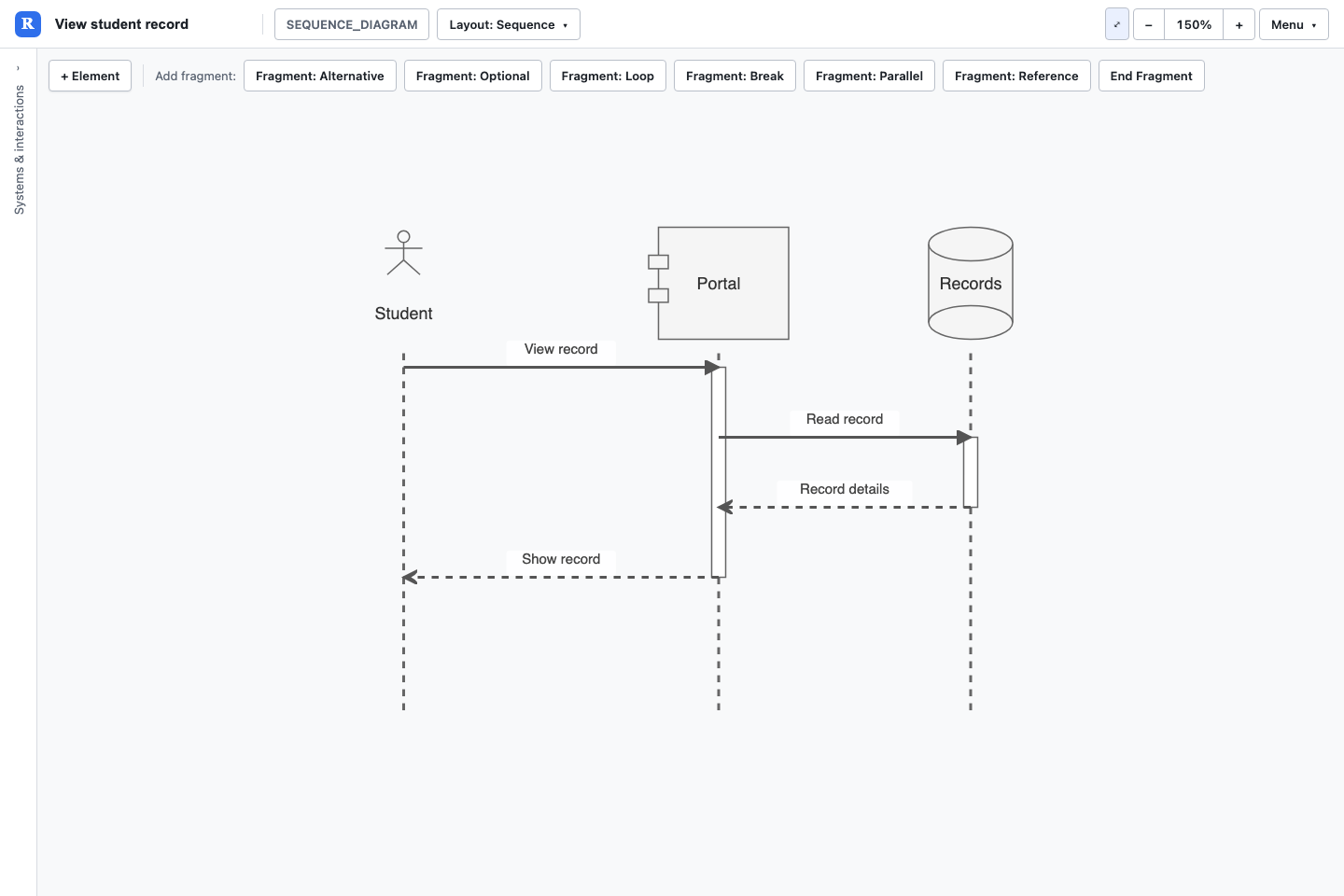
- Create a Sequence Diagram model and select the Sequence layout.
- Add participants for Student, Portal and Records using Actor, Component and Database types.
- Connect Student to Portal with a synchronous call, then Portal to Records with another call.
- Add returns from Records to Portal, then Portal to Student. Name each message with its purpose.
- Save and reopen the model to check message order.
Order matters
Interaction array/insertion order is message order. Sorting the Interactions table is only a table display change. For a substantial message reorder, work carefully with the JSON order or request a bounded Rovo update, preserving IDs and fragment nesting.
Fragments
The sequence palette offers fragment controls. A fragment opener and an End marker bracket a sequence of interactions; nested fragments close from the inside out. Loop, Optional, Alternative, Break, Parallel and Reference types are supported as labelled enclosures.
Alternative and Parallel fragments do not have separate else/operand compartments. Use clear guarded labels and, where appropriate, separate Optional fragments rather than implying a fully partitioned UML alt/par structure.
Participant lifecycle
Choose synchronous/asynchronous calls and returns deliberately. Create and Destroy messages indicate participant lifecycle changes. Found/Lost messages use an External participant at the unknown end; do not use External as an ordinary participant for other messages.
Fragments have no From/To endpoints. Their labels and position in the interaction array determine the enclosure. Review activation and lifecycle rendering after an import.
Download the sequence request example (JSON)
Try this with Rovo in Confluence
Choose the matching Revelation agent. Supply the destination page and review the result before sharing. Follow the Rovo guide to attach the created model to a macro.
Create a sequence diagram with Student, Portal and Records. Student calls Portal, Portal calls Records, Records returns details, then Portal returns the result to Student. Preserve that message order.Supported element types
| Name | Model token |
|---|---|
| Actor (Sequence) | SEQ_ACTOR |
| Boundary | SEQ_BOUNDARY |
| Control | SEQ_CONTROL |
| Entity (Sequence) | SEQ_ENTITY |
| Database (Sequence) | SEQ_DATABASE |
| Component (Sequence) | SEQ_COMPONENT |
| External | SEQ_EXTERNAL |
| Group | GROUP |
Supported relationship types
| Name | Model token |
|---|---|
| Synchronous Call | SEQ_SYNC_CALL |
| Asynchronous Call | SEQ_ASYNC_CALL |
| Return Message | SEQ_RETURN |
| Create Message | SEQ_CREATE |
| Destroy Message | SEQ_DESTROY |
| Found Message | SEQ_FOUND |
| Lost Message | SEQ_LOST |
| Fragment: Alternative | SEQ_FRG_ALT |
| Fragment: Optional | SEQ_FRG_OPT |
| Fragment: Loop | SEQ_FRG_LOOP |
| Fragment: Break | SEQ_FRG_BREAK |
| Fragment: Parallel | SEQ_FRG_PAR |
| Fragment: Reference | SEQ_FRG_REF |
| End Fragment | SEQ_FRG_END |